Savonia Article Pro: Automated Web Development Through Gen-AI Pipeline: Single & Multiple Webpage Demonstration
Savonia Article Pro is a collection of multidisciplinary Savonia expertise on various topics.
This work is licensed under CC BY-SA 4.0


Background
The process of converting a visual design into a fully functional website continues to follow a largely traditional and manual workflow. In most cases, designers begin by creating detailed mockups or prototypes that define the site’s layout, typography, color schemes, and user experience. These designs are typically static representations and do not inherently contain the logic or structure required for real-world functionality. As a result, developers must carefully interpret these visual assets and translate them into working code using languages such as HTML, CSS, and JavaScript, often supported by frameworks or content management systems.
This translation phase involves multiple steps, including building reusable templates, defining responsive behaviors, integrating design elements like fonts and colors, and configuring dynamic content fields for client-specific data. In addition, developers must ensure cross-browser compatibility, optimize performance, and prepare the website for deployment. For agencies handling numerous client websites, this process becomes repetitive, as each project requires similar steps despite minor variations in design. Consequently, the reliance on manual implementation not only consumes significant time and effort but also increases the likelihood of inconsistencies and inefficiencies, highlighting the need for more automated and streamlined approaches in modern web development workflows.
Prototype Development
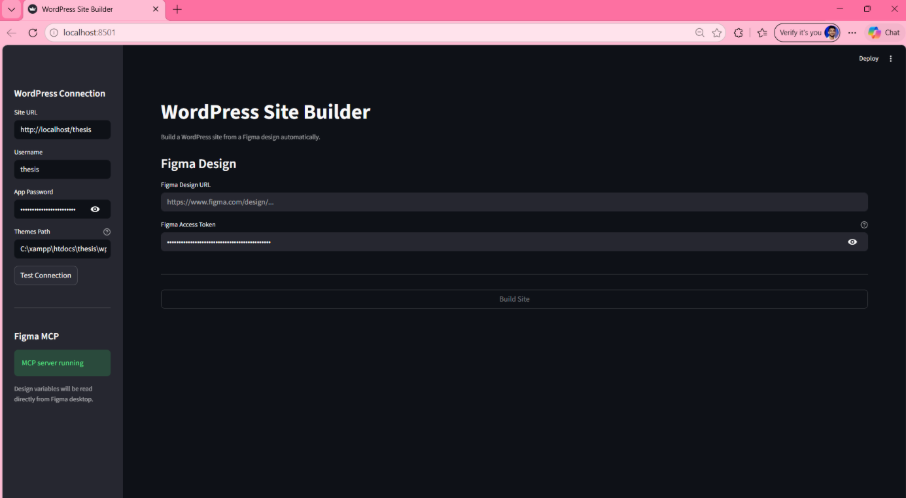
To address this challenge, a prototype pipeline was developed with the aim of simplifying and accelerating the traditional website development workflow. The idea behind this pipeline was to create a system that can directly take a Figma design URL as an input and transform it into a fully functional and deployed Sage WordPress theme integrated with ACF Gutenberg blocks. Instead of relying on the developer to manually interpret the layout and convert design elements into code, the pipeline attempts to automate most of these steps in a structured manner.
The developed solution is particularly targeted for web agencies that already use the Sage starter theme along with ACF blocks in their WordPress projects, making it aligned with commonly followed industry practices. By doing so, the pipeline ensures that it can be adopted in real-world scenarios without requiring major workflow changes. The main objective of this approach was to reduce repetitive manual work, such as template creation, field registration, and styling implementation. However, while the automation improves efficiency, it still depends on correct mapping of design components, which can introduce limitations in certain complex layouts or custom requirements.
Implementation
Implemented in Python, the pipeline systematically retrieves design data from Figma via the REST API, analyzes section content types, generates code based on best-practice recommendations from DeepSeek V3 and ChromaDB, and deploys WordPress theme files and pages in real time through the WordPress REST API. These automated procedures are executed sequentially: data acquisition, content analysis, code generation, and live deployment.
Results
The pipeline was evaluated using two actual Figma designs: a single-page restaurant website and a multi-page agency portfolio.
Both tests demonstrated significant time savings. Tasks such as theme setup and block scaffolding, which typically require four to twelve hours of developer effort, were completed in under five minutes.
• Test 1 (single-page design): In the single-page evaluation, the system accurately extracted brand colors from Figma’s variables panel and applied them to the live website within 60 to 90 seconds.
o Video demonstration: Single-page pipeline run
Figure name: Generated WordPress site — single-page result here to show the before and after
• Test 2 (multi-page design): The multi-page evaluation generated 16 blocks across two pages in approximately 90 seconds.
o Video demonstration: Multi-page pipeline run
o Figure name: Generated WordPress site — multi-page result here to show the before and after
Future Development
Several limitations remain. Images must be uploaded manually, and website navigation menus must be built manually.
The biggest area for future development is the template layout. At present, the system employs a uniform layout for each section type, irrespective of the distinct structural characteristics of the original Figma frames. In the future, upgrading to a multimodal AI model that can process images would allow the tool to receive a screenshot of each section and generate custom templates from the actual design rather than a fixed pattern.
References
• Advanced Custom Fields n.d. ACF Documentation. Internet publication. https://www.advancedcustomfields.com/resources/. Accessed 02.01.2026.
• Figma 2024a. Figma Developer API. Internet publication. https://www.figma.com/developers/api. Accessed 03.02.2
• Google Cloud n.d. What is Retrieval-Augmented Generation (RAG). Internet publication. https://cloud.google.com/use-cases/retrieval-augmented-generation. Accessed 12.12.2025.
• WordPress.org n.d. WordPress REST API Handbook. Internet publication. https://developer.wordpress.org/rest-api/. Accessed 06.01.2026.
Authors
Rajeev Kanth, Principal Lecturer, Savonia University of Applied Sciences, Finland
Sandesh Neupane, Student, Savonia University of Applied Sciences, Finland
This article was prepared with the help of AI.